
Why Phones Stop Charging and What to Check First

Your phone is at 4%, you plug it in, and nothing happens. Or worse, it only charges when the cable is bent at a certain angle. If you are wondering why phones stop charging, the answer is not always a bad battery. A loose cable, packed charging port, software glitch, moisture warning, or worn internal part can all cause the same frustrating result.
The good news is that many charging problems can be narrowed down safely in a few minutes. The key is knowing what to check first and when to stop troubleshooting before a small issue turns into damaged hardware.
Why Phones Stop Charging: The Most Common Causes
A phone needs several things to work together before its battery can charge: a working outlet, power adapter, cable, charging port, battery, and internal charging components. A problem with any one of them can interrupt charging.
Start with the simplest possibility. Test the phone with a different wall outlet, a known-good charging cable, and a different adapter if one is available. A cable can look perfectly fine on the outside while its internal wires are damaged from bending, pulling, or daily use. Wall adapters can also fail, especially after overheating or a power surge.
If the phone begins charging with another cable or adapter, you have found the issue without needing a repair. Replace the faulty accessory with a quality, compatible option. Cheap or damaged chargers may charge slowly, disconnect repeatedly, or create excess heat that is not good for your device.
Lint and debris inside the charging port
Pocket lint is one of the most common reasons a phone will not charge reliably. It collects deep in the port over time, preventing the cable from reaching the charging contacts fully. The cable may feel loose, fall out easily, or only work when held in place.
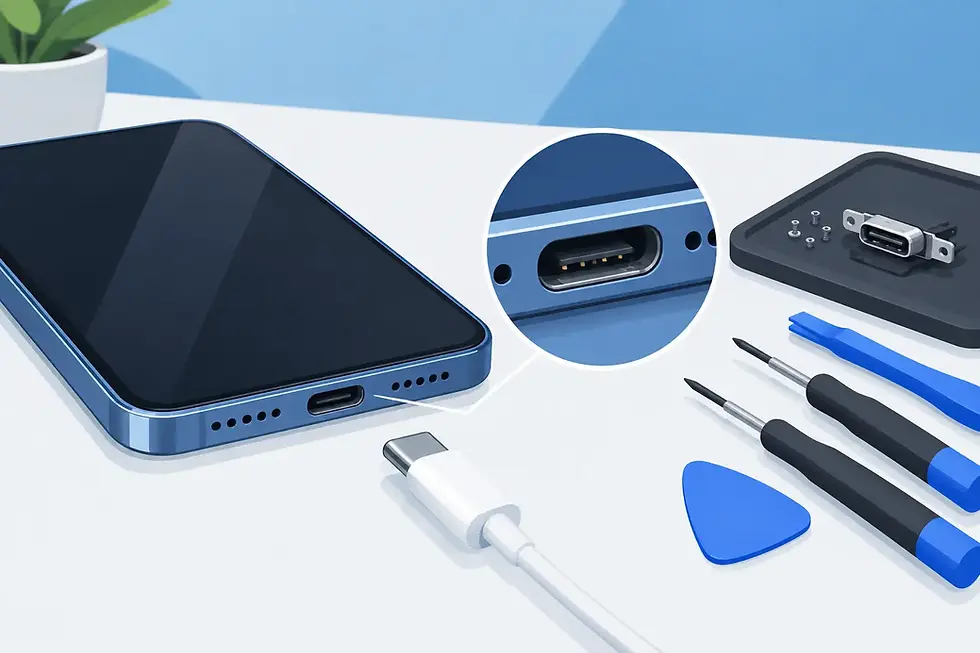
Turn off the phone if possible and use a flashlight to look into the port. Do not insert metal pins, paper clips, knives, or anything that can scratch the contacts. Those contacts are delicate, and one slip can turn a cleaning issue into a charging-port repair.
A gentle burst of air can help remove loose debris. If packed lint remains or the cable still will not seat firmly, professional cleaning is the safer choice. A technician can inspect the port without damaging the connection points or seals around it.
A damaged or worn charging port
If multiple tested cables fit loosely or charging cuts in and out when the phone moves, the port itself may be worn or damaged. This happens after normal use, accidental drops, moisture exposure, or repeated pressure on a cable while it is plugged in.
Charging-port damage does not always mean the port is visibly broken. Sometimes a device recognizes the charger but charges slowly. Other times it repeatedly connects and disconnects, makes a charging sound without gaining battery percentage, or refuses to charge at all.
This is not a good problem to force your way through by wiggling the cable. Continued movement can bend internal contacts further. A professional inspection can determine whether the port needs cleaning, adjustment, or replacement.
Battery wear and battery failure
Every rechargeable battery loses capacity over time. If your phone charges but drains unusually fast, shuts down at a percentage that should be safe, or gets stuck at a low percentage, the battery may be worn out. A weak battery can also make charging behavior seem inconsistent because it cannot hold power normally.
Battery trouble is more likely on a phone that is several years old or has been exposed to heat. Leaving a device in a hot car, using it heavily while charging, and repeated overheating can shorten battery life.
A swollen battery needs immediate attention. Signs can include a lifting screen, separating back glass, unusual heat, or a phone that no longer sits flat. Stop charging and using the device if you suspect swelling. Do not press the screen or try to open the phone yourself.
Software, Temperature, and Moisture Can Block Charging
Not every charging problem is physical. Phones use built-in protections that can pause charging when something is not safe.
A frozen operating system can prevent the charging indicator from appearing even though the device has power. Try a forced restart using the button combination for your specific phone model, then plug it in and allow it to sit for 15 to 30 minutes. A completely drained battery may need time before the screen turns on.
Heat is another common factor. If a phone is hot from navigation, gaming, video calls, sunlight, or a warm car, it may slow down or pause charging to protect the battery. Remove a heavy case, disconnect the charger, move the device to a cooler indoor spot, and let it return to room temperature. Avoid placing it in a refrigerator or freezer. Sudden temperature changes can create condensation inside the device.
Many modern phones also detect moisture in the charging port. If you see a liquid or moisture alert, unplug the cable and let the phone air-dry with the port facing down. Do not use heat guns, hair dryers, rice, or compressed air at close range. Heat can damage components, rice leaves dust behind, and forceful air can push moisture deeper into the phone.
Once the phone is fully dry, test charging again. If the alert remains, the port may still contain moisture or have corrosion that needs professional assessment.
Wireless Charging Problems Have Their Own Causes
If your phone charges wirelessly but not with a cable, the battery is probably not the main problem. The charging port, cable, or adapter is more likely at fault. If it charges by cable but not wirelessly, check the wireless pad, its power source, and the placement of your phone.
A thick case, magnetic accessory, metal plate, pop grip, or misaligned phone can interfere with wireless charging. Remove the case and center the phone carefully on the pad. Also check for heat. Wireless charging naturally creates more warmth than a cable, and devices may reduce charging speed when temperatures rise.
Wireless charging is convenient, but it is not a complete workaround for a failed port in every situation. You may still need a reliable wired connection for data transfer, emergency charging, accessories, or certain vehicle setups.
What Not to Do When Your Phone Will Not Charge
A dead phone creates urgency, especially when you need maps, work apps, payment access, or family contacts. Still, a few common shortcuts can make the repair more complicated.
Do not jam objects into the charging port, keep bending a damaged cable until it works, or charge a wet phone. Do not continue using a charger that sparks, smells burnt, becomes extremely hot, or has exposed wiring. Disconnect it immediately.
It is also wise to avoid opening a phone at home. Modern iPhone, Samsung Galaxy, Google Pixel, Motorola, OnePlus, and other Android devices are tightly assembled. Battery and port repairs often require specialized tools, replacement seals, and careful handling of fragile internal cables.
When It Is Time for Professional Charging Repair
If you have tested a working charger, checked for visible debris, allowed the phone to cool or dry, and restarted it, persistent charging trouble usually needs a closer look. This is especially true when the cable feels loose, the phone has had a recent drop, it shows moisture alerts, or it will not power on after charging.
A certified technician can test the charging port, battery health, charging cable connection, and internal power components to identify the actual failure. That matters because replacing the wrong part wastes time and may not restore dependable charging.
For Atlanta and Gwinnett device owners, IkePhones brings on-site charging-port, battery, water-damage, and software troubleshooting to your home, workplace, apartment, or another convenient location. You do not have to spend your day sitting in a repair-store line when your phone is already disrupting your schedule.
If your phone will only charge at an angle, will not hold a charge, or has stopped recognizing chargers altogether, treat it as a repair signal rather than a problem to keep working around. A timely inspection can get a critical device back in service before a loose connection, damaged battery, or moisture issue becomes more serious.


Comments