
Same Day Repair Guide for Phones That Can't Wait

A cracked screen before a work presentation. A phone that will not charge when you need directions. A battery dropping from 40% to dead before lunch. Those are not small inconveniences when your device handles calls, payments, schedules, family updates, and work. This same day repair guide helps you decide what to do first, what not to do, and when it makes sense to have a certified technician come to you.
Start by Protecting Your Phone and Your Data
Before focusing on the repair itself, take a minute to protect what is still working. If your phone turns on, back it up using its normal cloud backup setting or save the most important photos, contacts, and files. Do not delay a backup if the device is restarting, overheating, showing screen glitches, or losing power unusually fast. Those symptoms can get worse without much warning.
If the phone has been dropped in water, unplug it immediately and turn it off if possible. Do not charge it, use a hair dryer, place it in rice, or keep testing it every few minutes. Rice does not remove corrosion, and heat can damage internal components. A professional water-damage assessment is the safer next move.
For a badly cracked screen, avoid pressing hard on the damaged glass. Cover sharp areas with a screen protector or clear packing tape only as a short-term safety measure, then arrange a repair. If the screen is lifting away from the frame, the battery may be swollen. Stop using and charging the device, keep it away from heat, and seek professional help promptly.
Which Problems Usually Need Same-Day Repair?
Not every issue has to be fixed that afternoon, but some failures create a real disruption or can lead to more damage. A same-day appointment is especially useful when your phone is still usable but unreliable, or when it is completely out of action.
Cracked or Unresponsive Screens
A screen can crack and still display normally at first. The trouble is that small cracks often spread, touch response can fail, and exposed areas become more vulnerable to moisture and dust. If you see black spots, colored lines, flashing, ghost touches, or no image at all, the display damage is likely more than cosmetic.
Screen replacement can restore visibility, touch function, and safe daily use for many iPhone, Samsung Galaxy, Google Pixel, Motorola, OnePlus, and other Android devices. If you can still unlock your phone, back it up before the appointment whenever possible.
Batteries That Drain, Shut Down, or Swell
A weak battery does more than make your phone annoying to use. It can cause unexpected shutdowns, slow performance, overheating, and inaccurate battery readings. You may notice the phone dying at 20% or 30%, needing multiple charges each day, or getting hot during simple tasks.
Battery replacement is often the practical answer when the rest of the device works well. However, if the phone only drains quickly after a recent software update or in areas with poor signal, a technician may first check for software or connection-related causes. Good repair starts with diagnosing the actual problem instead of replacing parts blindly.
Charging-Port Problems
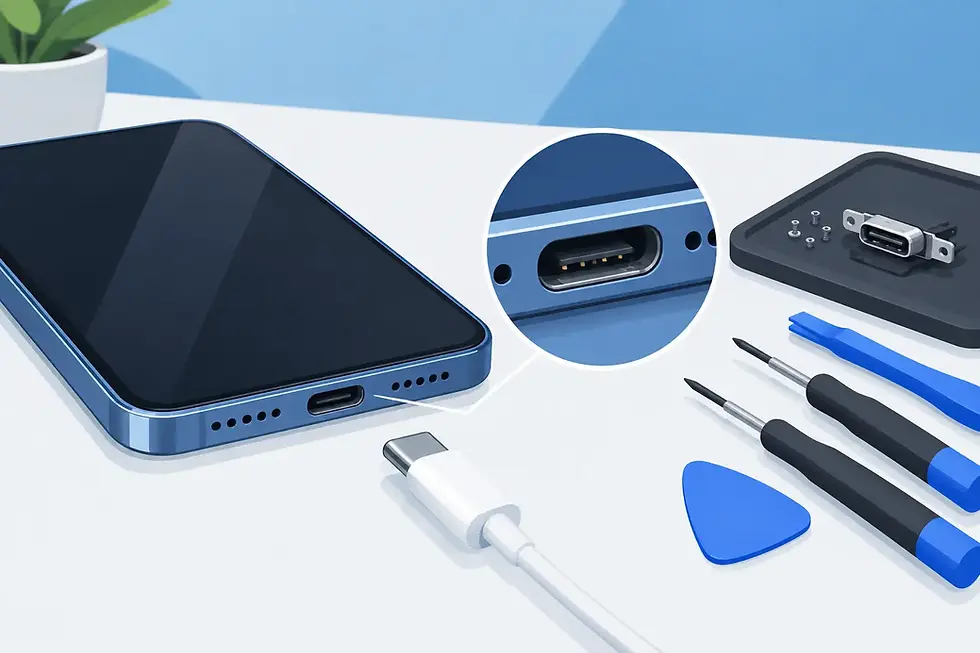
If your charging cable works only at a certain angle, falls out of the port, or charges inconsistently, do not keep forcing it. Pocket lint can build up in a port, but worn connectors, bent internal pins, moisture exposure, and cable damage can create similar symptoms.
Try a different known-good cable and power adapter before assuming the port has failed. If the issue continues, a charging-port inspection can determine whether cleaning, repair, or replacement is needed. Avoid inserting metal tools into the port. A quick DIY scrape can turn a minor issue into a more involved repair.
Camera, Speaker, Microphone, and Button Failures
A camera that will not focus can ruin a document scan, a child's event, or a quick work photo. A muffled speaker, failed microphone, or broken volume button can be just as disruptive when you rely on your device throughout the day.
Restarting the phone and checking for blocked openings can rule out a simple software or debris issue. When the problem remains, professional repair can address damaged components without asking you to spend hours troubleshooting settings. This is particularly useful when you need reliable calls, video meetings, navigation prompts, or photos right away.
A Same Day Repair Guide for a Smoother Appointment
Fast repair works best when the technician has the right information before arriving. When you request service, share the device brand, model, color if relevant for a back-glass repair, and a clear description of what happened. “My screen is cracked” is helpful, but “my iPhone screen is cracked, the display has green lines, and touch works only on the left side” helps narrow down the likely repair.
Have your passcode available if the technician needs to test functions after repair. You can stay present while testing is completed, and you should confirm the essentials before the appointment ends: touch response, display brightness, charging, cameras, speakers, microphones, buttons, and wireless connections as applicable.
Choose a safe, practical location with a place to meet and enough time to inspect the device. Your home, office, apartment lobby, workplace, or another convenient public meeting location can work well. Mobile service removes the extra trip to a repair store and lets you fit the repair around a busy day rather than losing the afternoon to a waiting room.
Know When Repair Can Wait - and When It Shouldn't
A minor hairline crack that does not affect the display may be able to wait a few days if you protect the screen and continue backing up your data. A battery that lasts slightly less than it used to may also be manageable for a short period with a charger nearby.
Other signs call for faster action. These include a swollen battery, overheating that continues after restarting, a phone that smells burnt, a charging port that sparks or becomes unusually hot, water exposure, a display that is separating from the frame, or a device that will not power on after a drop. Stop charging a device with any of these symptoms until it has been assessed.
There is also a practical urgency. If your phone is your work line, your ride home, your payment method, or your connection to family, waiting for a convenient repair window may cost more time than scheduling help now. Same-day service is not only about fixing a part quickly. It is about getting your routine back.
Avoid These Common Repair Mistakes
The fastest path is not always the safest one. A cheap adhesive kit may look tempting for a cracked screen, but improper installation can affect face recognition sensors, water resistance, display quality, or touch performance. Using the wrong battery or charging component can create reliability and safety issues.
Be cautious with online troubleshooting advice that treats every problem the same. A black screen might be a failed display, but it could also be a depleted battery, charging issue, software crash, or internal board damage. Repeatedly resetting the phone, forcing cables into the port, or opening the device without the right tools can complicate the repair.
A certified technician can identify the failure, use quality parts, and test the device after service. That matters whether you have an iPhone with a shattered display, a Samsung with a weak battery, a Pixel with charging trouble, or a tablet that stopped responding before school or work.
Get Your Device Back Into Your Day
When a device failure interrupts your day, the goal is simple: protect your data, avoid making the damage worse, and get the right repair without adding another errand. IkePhones brings on-site phone, tablet, and smartwatch repair to customers across Atlanta and Gwinnett County, so you can meet a technician where your schedule already is.
Take a clear look at the symptom, stop using the device if there is a safety concern, and request an appointment with the model and issue ready. A broken phone does not need to take over your day - the right repair can put it back where it belongs: in your hand and working when you need it.


Comments